Why pay for a website when I can build one free?
What free platforms actually deliver, where they fall short, and a checklist to decide if DIY is enough or you need help — without guilt or empty marketing.
Building a free website today is easy. Building one someone reads, understands, and uses — that is a different conversation.
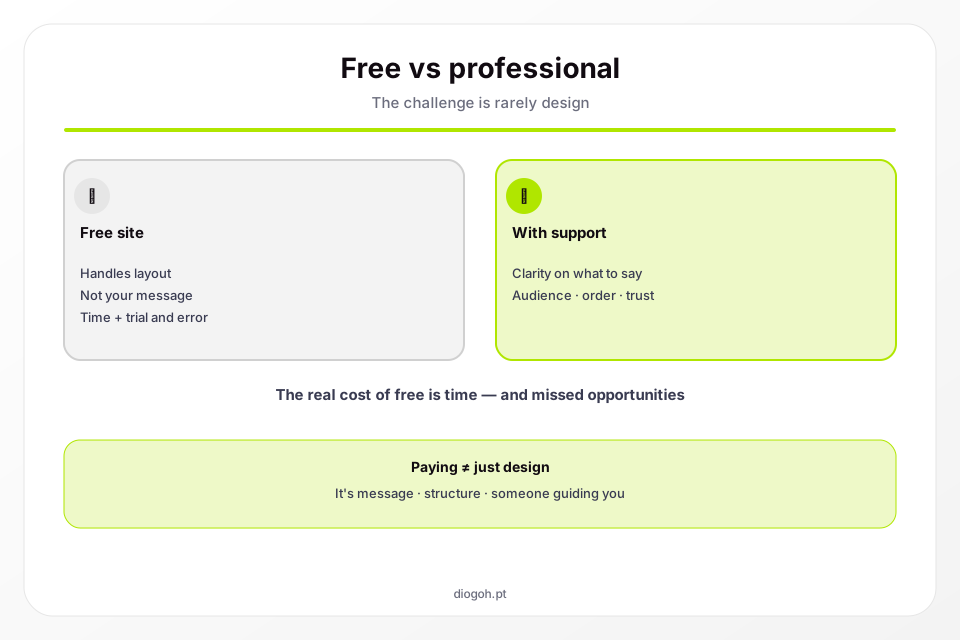
Wix, WordPress.com, Google Sites, Notion, Canva — all promise «site in minutes». And they deliver: in minutes you have pages. The problem is rarely building. It is deciding what to build.
This article will not say free platforms are bad. They are perfect for many people. It will help you see where free is enough and where the hidden cost appears — time, opportunities, clarity.
What «free website» actually includes
| Included | Not included |
|---|---|
| Visual templates | Clarity on what to write |
| Drag-and-drop editor | Page structure designed for your business |
| Basic hosting | Copy that turns visits into enquiries |
Subdomain (e.g. name.wixsite.com) | Your own domain (or costs extra) |
| Generic form | CTA strategy and visitor flow |
Translation: you get the toolbox. You design, build, and furnish the house yourself.
The problem is not design — it is the message
Compare these two headlines for the same therapist:
Version A (generic template): «Welcome to my website. Here you will find information about my services.»
Version B (clear message): «Therapy for adults with anxiety — in person in Bristol and online. First conversation with no obligation.»
Version A can look beautiful. Version B converts — because it answers what the visitor brings: is this for me? where? how do I proceed?
Free platforms do not help you write Version B. They give you empty text boxes.
Four questions your site must answer
Before choosing a template, answer:
- Who is this for? (specific, not «everyone»)
- What problem does it solve? (concrete, not «improve lives»)
- Why you? (real difference, not «passion and dedication»)
- What to do next? (one clear CTA)
If you cannot answer in short sentences, the blocker is not technical — it is strategic. Paying someone or investing time to clarify is worth more than choosing fonts.
The hidden cost of free
Time
Honest estimate for DIY without experience:
- Choose platform and template: 2–5 h
- Write copy (with rewrites): 5–15 h
- Adjust design, photos, mobile: 3–8 h
- Set up domain, email, form, GDPR: 2–4 h
- Total: 12–32 hours
If your time is worth £30/h, «free» cost £360–£960 — paid in weekends and frustration.
Opportunities
Each month with a confusing or missing site while competitors appear on Google is a lost enquiry. Hard to measure, but real — especially in professions where online search precedes contact.
Endless iteration
Without clear structure, you change the headline today, the photo tomorrow, section order on Friday. Contradictory friend opinions. Permanent feeling that «something is missing».
A professional (or a disciplined process) forces: decide, write, publish, measure.
When free is perfectly enough
DIY on a free (or cheap) platform makes sense if:
- You know exactly what you want to say
- The site is a business card, not your main client channel
- You have time and (ideally) enjoy the process
- The business is simple to explain on one page
- You do not depend on Google for new clients
- You already have clients and the site is a complement
Example: freelance translator with fixed agency clients. One-page site with services, languages, contact — done in an afternoon on Notion or Google Sites. Works.
When paying makes sense
Consider investing (time in a professional or money) if:
- The service requires trust (health, legal, finance, education)
- You tried DIY and the site is «done» but generates no enquiries
- Each client is worth hundreds or thousands — one extra enquiry pays for the site
- You do not know where to start writing
- You need to appear on Google for specific searches
- The time you would spend on DIY costs more than the budget
What changes when you work with someone (without romanticising)
A good professional process does not start with «pick a template». It starts with:
- Who is the ideal client? — one concrete person, not «businesses»
- What does that person need to hear? — in the right order
- What action do we want? — book, write, call
- Design in service of that — not the other way around
It does not have to be me. You need someone (or yourself, with discipline) to ask these questions before opening the editor.
Checklist: is your DIY site working?
Score honestly (1 point each):
- A visitor understands in 10 seconds what you do
- They know who the service is for
- They find price or price guidance (or understand why not)
- Contact is one click away at any scroll position
- It works well on mobile
- It loads in under 3 seconds
- You appear on Google when searching your name
- You received at least 1 enquiry from the site in the last 3 months
0–3: the site needs work (message or technical).
4–6: solid base, optimise details.
7–8: it is working — keep it updated.
Middle path: free with structure
If you want to save money but not get lost:
- Write all copy in a Google Doc before touching the editor
- Use structure: Problem → Solution → How it works → Proof → CTA → FAQ
- Ask 2 people from your target audience (not friends) to read and say what they understood
- Publish ugly but clear — iterate later
- Only then choose template and colours
This saves half the DIY time.
Summary
| Free site (DIY) | Professional site | |
|---|---|---|
| Best for | Business card, simple business, zero budget | Client channel, complex services, trust |
| Money cost | Low | £250–1,300+ |
| Time cost | High | Low |
| Main risk | Pretty site, empty message | Choosing the wrong provider |
| When it fails | You do not know what to write | Poorly defined scope |
There is no moral answer («should DIY» vs. «should pay»). There is context.
If the checklist showed you need help with the message — 2-minute qualification. Proposal within 48 hours, no obligation. If DIY is enough, this article already gave you the structure to move forward alone.
Ready to take the next step?
Pick a plan, browse models for your industry, and request a proposal — reply within 24 hours.